Akkodis Dataset Analysis
Overview
The Akkodis Dataset consists of 40 columns and 21,277 entries. Each
candidate is identified by its ID and can appear in more than one
row, each one specific for an Event_type__val.
Dataset Description
Features
ID: unique identifier for the candidate
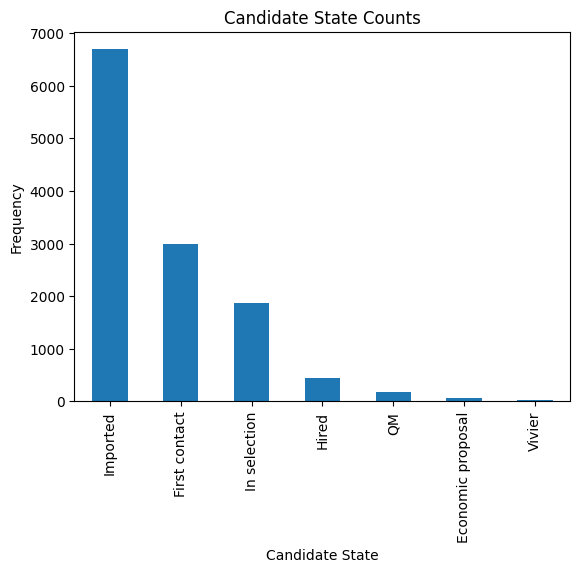
Candidate State: status of the candidate’s application
Hired: the candidate has been selectedVivier: the candidate will be taken in consideration for future opportunitiesQM: Qualification Meeting ??In selection: selection phaseFirst contact: the candidate has been contacted from the company for the first timeEconomic proposal: the company has made a proposal to the candidateImported: the candidate has been transfered from another DB ??
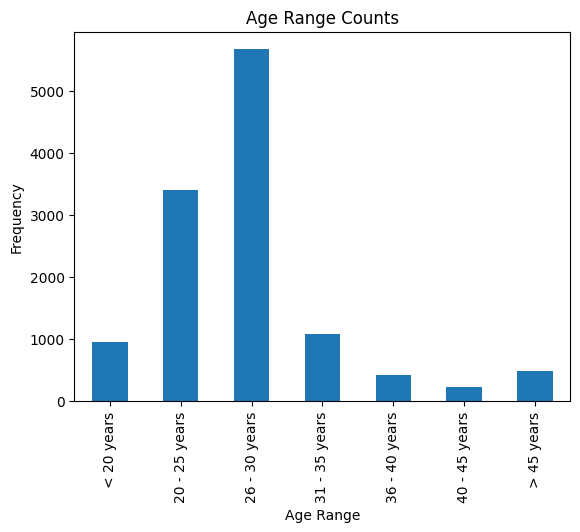
Age Range: range of age for the candidate
< 2020 - 2526 - 3031 - 3536 - 4040 - 45> 45
Residence: current place of residence for the candidate
Sex: gender identification (
Male|Female)Protected Category: indicates if the candidate falls into a protected category
Article 1Article 18Not Specified
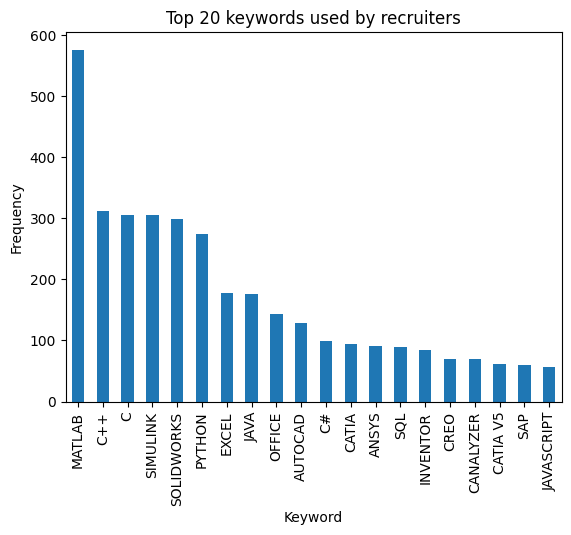
TAG: keywords used by recruiter
Study Area: Field of study or academic discipline
Study Title: Academic degree or title obtained
Five-year degreeDoctorateHigh school graduationThree-year degreemaster's degreeProfessional qualificationMiddle school diploma
Years Experience: number of years of professional experience
00-11-33-55-77-10+10
Sector: industry or sector in which the candidate has experience
Last Role: candidate’s most recent job role
Year of Insertion: year when the candidate’s information was entered into the portal
Year of Recruitment: year in which the candidate was hired
Recruitment Request: represents the application request for a candidacy
Assumption Headquarters: headquarters location associated with the hiring assumption
Job Family Hiring: Job family or category for the hiring position
Job Title Hiring: specific job title for the hiring position
Event_type__val: It specifies the stage of the recruitment process for the candidate
Event_feedback: feedback received from an event (
OK|KO)Linked_search__key: keys indicate the number of searches conducted for a job position
Overall: overall assessment, interview score
1 - Lowor~ 1 - Low2 - Mediumor~ 2 - Medium3 - Highor~ 3 - High4 - Topor~ 4 - Top
Job Description: description of the job role
Candidate Profile: ideal profile information for the candidate, requested by the company
Years Experience.1: additional field for specifying years of experience requested
Minimum Ral (Gross Annual Salary): minimum expected gross annual salary
Ral Maximum: maximum expected gross annual salary
Study Level: level of study requested for the job position, the values are equivalent to
Study TitleStudy Area.1: additional field for specifying the academic field of study requested
Akkodis headquarters: headquarters location for Akkodis
Current Ral: current or existing salary
Expected Ral: expected salary
Technical Skills: skills related to technical or specialized expertise from 1 to 4
Standing/Position: standing or position within the organization from 1 to 4
Comunication: communication skills from 1 to 4
Maturity: level of maturity from 1 to 4
Dynamism: level of Dynamism from 1 to 4
Mobility: mobility from 1 to 4
English: proficiency in the English language from 1 to 4
Possible Target Variables
Some possible target variables in this dataset could be:
Suitability: a new column that defines if a candidate is suitable for the position, based on the information provided.
Possible RAL: a new column that predicts the adequate RAL for the candidate profile.
However the dataset contains very few samples with RAL values specified:
94.53% of samples have no Minimum Ral specified
92.85% of samples have no Ral Maximum specified
80.56% of samples have no Current Ral specified
80.73% of samples have no Expected Ral specified
The suitability of a candidate could be obtained through
Candidate State and Event_Feedback. However the 2 columns don’t
seem to be always consistent as we can find samples with both Hired
as Candidate State and KO as Event_feedback:
         Candidate State        Event_Type__Val              Event_Feedback
13                    QM  Qualification Meeting       KO (technical skills)
87                 Hired    Technical interview     KO (opportunity closed)
112                Hired    Technical interview  KO (proposed renunciation)
122    Economic proposal      Economic proposal  KO (proposed renunciation)
141         In selection           BM interview                KO (manager)
...                  ...                    ...                         ...
21281       In selection           HR interview       KO (technical skills)
21300  Economic proposal      Economic proposal  KO (proposed renunciation)
21315       In selection           HR interview                KO (manager)
21316       In selection           BM interview                KO (manager)
21336       In selection           HR interview                KO (retired)

[854 rows x 3 columns]
Data Cleaning
Duplicates
Each candidate has more than one row in the dataset, one for each
Event_type__val. To ensure consistency only the most recent one should be kept while all the other occurencies should be dropped. It can be assumed that the last line of each ID is the most recent one.
df_nodup = df.drop_duplicates(subset='Id', keep='last')
This however reduces drastically the number of samples in the dataset, from 21 377 to 12 263 rows, removing the 43% of the whole dataset.
42.63% of the dataset were duplicates
Unuseful Columns
Some columns might be unuseful such as ID, Year Of Insertion,
Linked_Search__Key …
columns_to_drop = ['Id', 'Last Role', 'Year Of Insertion',
                   'Assumption Headquarters', 'Linked_Search__Key',
                   'Akkodis Headquarters']
Some features are often not specified so filling with default values might not be the right choice. A threshold could be set to select the columns to drop. For example features specified in less than 40% of the samples could be considered unuseful.
<Id> null count: 0.00%
<Candidate State> null count: 0.00%
<Age Range> null count: 0.00%
<Residence> null count: 0.01%
<Sex> null count: 0.00%
<Protected Category> null count: 99.60%
<Tag> null count: 50.19%
<Study Area> null count: 0.21%
<Study Title> null count: 0.00%
<Years Experience> null count: 0.00%
<Sector> null count: 42.86%
<Last Role> null count: 42.86%
<Year Of Insertion> null count: 0.00%
<Year Of Recruitment> null count: 88.82%
<Recruitment Request> null count: 90.20%
<Assumption Headquarters> null count: 88.86%
<Job Family Hiring> null count: 88.86%
<Job Title Hiring> null count: 88.86%
<Event_Type__Val> null count: 7.44%
<Event_Feedback> null count: 72.65%
<Linked_Search__Key> null count: 70.41%
<Overall> null count: 72.01%
<Job Description> null count: 90.09%
<Candidate Profile> null count: 90.22%
<Years Experience.1> null count: 90.08%
<Minimum Ral> null count: 94.53%
<Ral Maximum> null count: 92.85%
<Study Level> null count: 90.08%
<Study Area.1> null count: 90.08%
<Akkodis Headquarters> null count: 90.08%
<Current Ral> null count: 80.56%
<Expected Ral> null count: 80.73%
<Technical Skills> null count: 72.14%
<Standing/Position> null count: 72.05%
<Comunication> null count: 72.08%
<Maturity> null count: 72.10%
<Dynamism> null count: 72.10%
<Mobility> null count: 72.05%
<English> null count: 72.19%
df = df_nodup.drop(columns=columns_to_drop)
The remaining columns are:

Index(['Candidate State', 'Age Range', 'Residence', 'Sex',
       'Protected Category', 'Tag', 'Study Area', 'Study Title',
       'Years Experience', 'Sector', 'Event_Type__Val', 'Event_Feedback'],
      dtype='object')
NaNs Handling
There are still many columns without specified values for some samples.
Columns that contain NaN values:
 ['Residence', 'Protected Category', 'Tag', 'Study Area', 'Sector', 'Event_Type__Val', 'Event_Feedback']
In order to define default values each feature needs to be analyzed:
Residence values: ['TURIN » Turin ~ Piedmont' 'CONVERSANO » Bari ~ Puglia'
 'CASERTA » Caserta ~ Campania' ...
 'SAN FELICE A CANCELLO » Caserta ~ Campania'
 'PERDIFUMO » Salerno ~ Campania'
 'PALMANOVA » Udine ~ Friuli Venezia Giulia']

Protected Category values: [nan 'Article 1' 'Article 18']

Tag values: ['AUTOSAR, CAN, C, C++, MATLAB/SIMULINK, VECTOR/VENUS, VHDL, FPGA'
 '-, C, C++, DO178, LABVIEW, SOFTWARE DEVELOPMENT' 'PROCESS ENG.' ...
 '-, SOLIDWORKS, NX, CREO, INENTOR, GT POWER, AMESIM' 'SQL, UNIX'
 '-, ENVIRONMENTAL QUALITY, ENVIRONMENTAL MANAGER, ENVIRONMENTAL PROJECT ENGINEER, ISO 14001, ENVIRONMENTAL MANAGEMENT , ISO 14001, ENVIRONMENTAL MANAGEMENT, OFFSHORE']

Study Area values: ['Automation/Mechatronics Engineering' 'computer engineering'
 'chemical engineering' 'Legal' 'Mechanical engineering'
 'Telecommunications Engineering' 'Economic - Statistics'
 'Materials Science and Engineering' 'Other scientific subjects'
 'Biomedical Engineering' 'electronic Engineering'
 'Information Engineering'
 'Aeronautical/Aerospace/Astronautics Engineering'
 'Energy and Nuclear Engineering' 'Informatics' 'Management Engineering'
 'Automotive Engineering' 'industrial engineering' 'Other' 'Surveyor'
 'Electrical Engineering' 'Scientific maturity' 'Chemist - Pharmaceutical'
 'Political-Social' 'Other humanities subjects' 'Geo-Biological'
 'Civil/Civil and Environmental Engineering' 'Psychology' 'Linguistics'
 'Agriculture and veterinary' 'Literary' 'Humanistic high school diploma'
 'Accounting' 'Communication Sciences' 'Safety Engineering' 'Architecture'
 'Mathematics' 'construction Engineering' 'Petroleum Engineering'
 'Naval Engineering' 'Artistic' nan
 'Mathematical-physical modeling for engineering'
 'Engineering for the environment and the territory' 'Medical'
 'Defense and Security' 'Physical education' 'Statistics']

Sector values: ['Automotive' 'Aeronautics' 'Consulting' 'Telecom' 'Others' 'Space'
 'Life sciences' nan 'Railway' 'Defence' 'Naval'
 'Services and Information Systems' 'Energy' 'Machining - Heavy Industry'
 'Oil and Gas']

Event_Type__Val values: ['BM interview' 'Candidate notification' 'Qualification Meeting'
 'Technical interview' 'HR interview' 'CV request' 'Contact note'
 'Inadequate CV' 'Economic proposal' 'Research association'
 'Sending SC to customer' nan 'Commercial note']

Event_Feedback values: ['OK' nan 'KO (technical skills)' 'OK (waiting for departure)'
 'KO (proposed renunciation)' 'OK (live)' 'KO (mobility)' 'KO (manager)'
 'KO (retired)' 'OK (hired)' 'KO (seniority)' 'KO (ral)'
 'OK (other candidate)' 'KO (opportunity closed)' 'KO (lost availability)'
 'KO (language skills)']
Some default values could be:
df['Residence'] = df['Residence'].fillna('Not Specified')

df['Protected Category'] = df['Protected Category'].fillna('No')

df['Tag'] = df['Tag'].fillna('Not Specified')

df['Study Area'] = df['Study Area'].fillna('Not Specified')

df['Sector'] = df['Sector'].fillna('Not Specified')

df['Event_Type__Val'] = df['Event_Type__Val'].fillna('Not Specified')

df['Event_Feedback'] = df['Event_Feedback'].fillna('Not Specified')
Feature Mapping
Feature mapping can be used to simplify the values in the dataset.
Let’s analyze each feature:
Candidate State
Age Range
Residence
Mapping can be used to simplify this feature.
['TURIN » Turin ~ Piedmont' 'CONVERSANO » Bari ~ Puglia'
 'CASERTA » Caserta ~ Campania' ...
 'SAN FELICE A CANCELLO » Caserta ~ Campania'
 'PERDIFUMO » Salerno ~ Campania'
 'PALMANOVA » Udine ~ Friuli Venezia Giulia']
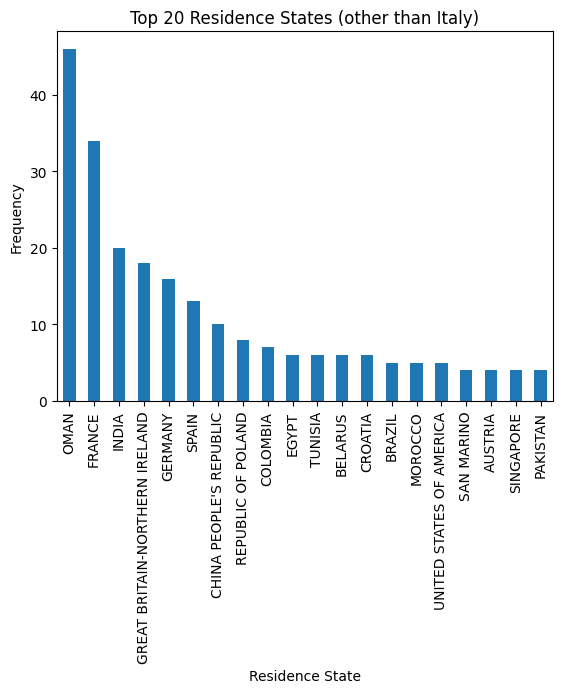
List of residence states of the candidates in the dataset:
 ['ALBANIA', 'ALGERIA', 'AUSTRIA', 'BELARUS', 'BELGIUM', 'BRAZIL', 'BULGARIA', 'CHILE', "CHINA PEOPLE'S REPUBLIC", 'COLOMBIA', 'CROATIA', 'CZECH REPUBLIC', 'EGYPT', 'ERITREA', 'FRANCE', 'GERMANY', 'GREAT BRITAIN-NORTHERN IRELAND', 'GREECE', 'GRENADA', 'HAITI', 'INDIA', 'INDONESIA', 'IRAN', 'ITALY', 'KUWAIT', 'LEBANON', 'LIBYA', 'LITHUANIA', 'MALAYSIA', 'MALTA', 'MEXICO', 'MONACO', 'MOROCCO', 'NETHERLANDS', 'NIGERIA', 'OMAN', 'PAKISTAN', 'PHILIPPINES', 'PORTUGAL', 'QATAR', 'REPUBLIC OF POLAND', 'ROMANIA', 'RUSSIAN FEDERATION', 'SAINT LUCIA', 'SAINT PIERRE ET MIQUELON (ISLANDS)', 'SAN MARINO', 'SERBIA AND MONTENEGRO', 'SINGAPORE', 'SLOVAKIA', 'SOUTH AFRICAN REPUBLIC', 'SPAIN', 'SRI LANKA', 'SWEDEN', 'SWITZERLAND', 'SYRIA', 'TONGA', 'TUNISIA', 'Türkiye', 'UKRAINE', 'UNITED ARAB EMIRATES', 'UNITED STATES OF AMERICA', 'USSR', 'UZBEKISTAN', 'VENEZUELA', 'YUGOSLAVIA']
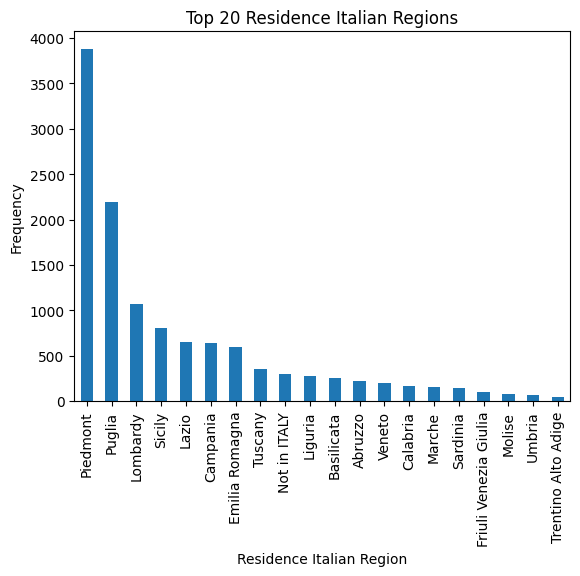
List of residence italian regions of the candidates in the dataset:
 ['Abruzzo', 'Aosta Valley', 'Basilicata', 'Calabria', 'Campania', 'Emilia Romagna', 'Friuli Venezia Giulia', 'Lazio', 'Liguria', 'Lombardy', 'Marche', 'Molise', 'Not Specified', 'Piedmont', 'Puglia', 'Sardinia', 'Sicily', 'Trentino Alto Adige', 'Tuscany', 'Umbria', 'Veneto']
def map_residence(value):
    for region in italy_list:
        if region in value:
          return region
    for state in state_list:
        if state in value:
          return state
    return 'Not Specified'
The values in the Residence column could be replaced with the Italian region, for Italian residents, or with the state, for non-Italian residents.
df['Residence'] = df['Residence'].apply(map_residence)
df['Residence'] = df['Residence'].replace('Türkiye', 'TURKEY')
df['Residence'] = df['Residence'].replace('USSR', 'RUSSIAN FEDERATION')
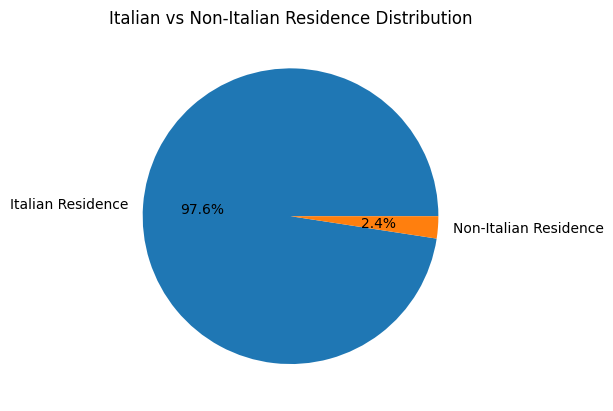
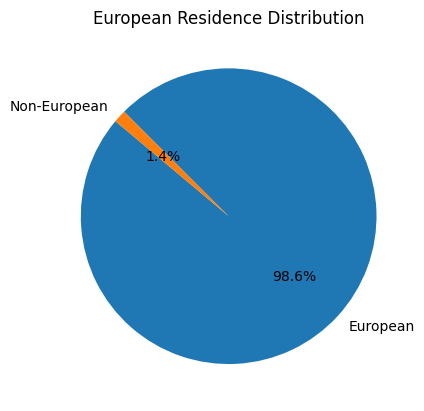
To better define residence 3 new columns could be added:
Residence State, Residence Italian Region,
European Residence. This kind of information must be protected
but should also be taken into account to ensure Fairness.
european_countries = [
    'ALBANIA', 'AUSTRIA', 'BELARUS', 'BELGIUM', 'BULGARIA', 'CROATIA', 'CZECH REPUBLIC',
    'FRANCE', 'GERMANY', 'GREAT BRITAIN-NORTHERN IRELAND', 'GREECE', 'ITALY', 'LATVIA',
    'LITHUANIA', 'LUXEMBOURG', 'MALTA', 'MOLDOVA', 'MONACO', 'MONTENEGRO', 'NETHERLANDS',
    'NORWAY', 'POLAND', 'PORTUGAL', 'ROMANIA', 'RUSSIA', 'SAN MARINO', 'SERBIA', 'SLOVAKIA',
    'SLOVENIA', 'SPAIN', 'SWEDEN', 'SWITZERLAND', 'UKRAINE'
]
df['European Residence'] = df['Residence State'].apply(lambda x: 'Yes' if x in european_countries else 'No')
The Residence column could then be removed.
df = df.drop(columns=['Residence'])
Sex
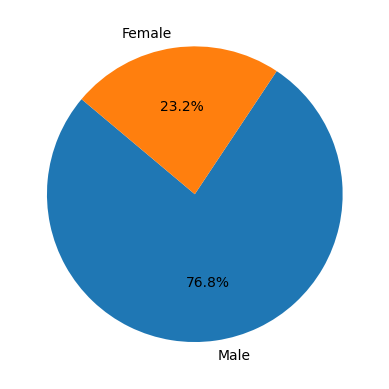
The dataset is skewed toward the Sex feature, with 76.8% male candidates and 23.2% female candidates.
Protected Category
Mapping can be applied to simplify this feature and distinguish between candidates who are part of a protected category and candidates who are not, regardless of the Article.
df['Protected Category'] = df['Protected Category'].replace('Article 18', 'Yes')
df['Protected Category'] = df['Protected Category'].replace('Article 1', 'Yes')
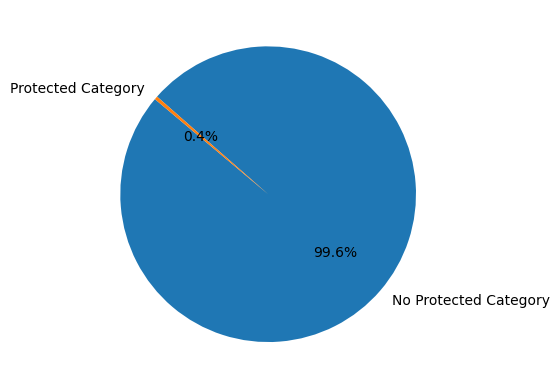
The dataset is highly skewed with respect to this feature, with only 0.4% of candidates coming from protected categories.
Tag
This feature is highly irregular and requires further processing to be useful. A preliminary mapping could be applied to unify cases where no keyword is specified.
df['Tag'] = df['Tag'].replace('-', 'Not Specified')
df['Tag'] = df['Tag'].replace('.', 'Not Specified')
df['Tag'] = df['Tag'].replace('X', 'Not Specified')
['AUTOSAR, CAN, C, C++, MATLAB/SIMULINK, VECTOR/VENUS, VHDL, FPGA'
 '-, C, C++, DO178, LABVIEW, SOFTWARE DEVELOPMENT' 'PROCESS ENG.' ...
 '-, SOLIDWORKS, NX, CREO, INENTOR, GT POWER, AMESIM' 'SQL, UNIX'
 '-, ENVIRONMENTAL QUALITY, ENVIRONMENTAL MANAGER, ENVIRONMENTAL PROJECT ENGINEER, ISO 14001, ENVIRONMENTAL MANAGEMENT , ISO 14001, ENVIRONMENTAL MANAGEMENT, OFFSHORE']
Study Area
There are 48 different <Study Area> values:
 ['Automation/Mechatronics Engineering' 'computer engineering'
 'chemical engineering' 'Legal' 'Mechanical engineering'
 'Telecommunications Engineering' 'Economic - Statistics'
 'Materials Science and Engineering' 'Other scientific subjects'
 'Biomedical Engineering' 'electronic Engineering'
 'Information Engineering'
 'Aeronautical/Aerospace/Astronautics Engineering'
 'Energy and Nuclear Engineering' 'Informatics' 'Management Engineering'
 'Automotive Engineering' 'industrial engineering' 'Other' 'Surveyor'
 'Electrical Engineering' 'Scientific maturity' 'Chemist - Pharmaceutical'
 'Political-Social' 'Other humanities subjects' 'Geo-Biological'
 'Civil/Civil and Environmental Engineering' 'Psychology' 'Linguistics'
 'Agriculture and veterinary' 'Literary' 'Humanistic high school diploma'
 'Accounting' 'Communication Sciences' 'Safety Engineering' 'Architecture'
 'Mathematics' 'construction Engineering' 'Petroleum Engineering'
 'Naval Engineering' 'Artistic' 'Not Specified'
 'Mathematical-physical modeling for engineering'
 'Engineering for the environment and the territory' 'Medical'
 'Defense and Security' 'Physical education' 'Statistics']

Study Title
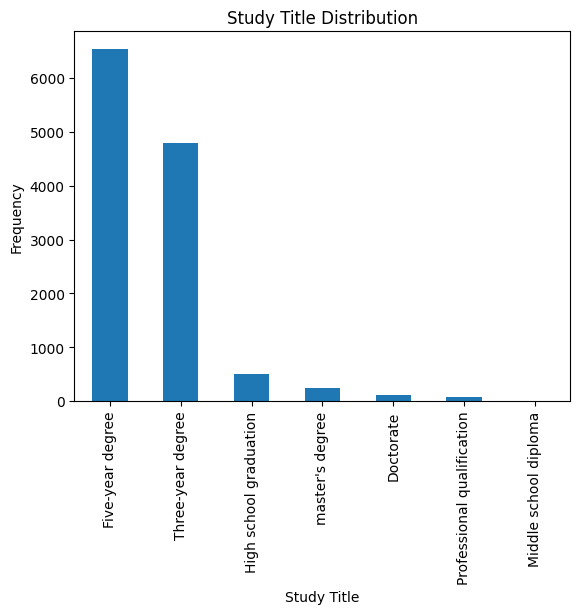
There are 7 different <Study Title> values:
 ['Five-year degree' 'Doctorate' 'High school graduation'
 'Three-year degree' "master's degree" 'Middle school diploma'
 'Professional qualification']
Years Experience
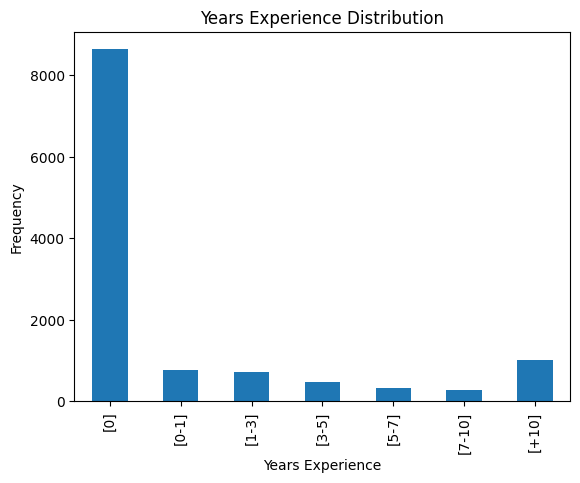
There are 7 different <Years Experience> categories:
 ['[1-3]' '[7-10]' '[3-5]' '[5-7]' '[+10]' '[0]' '[0-1]']
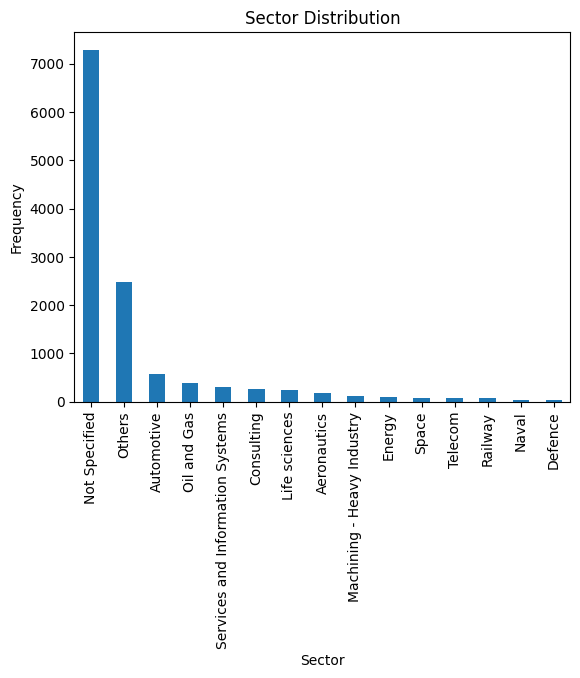
Sector
This feature does not seem relevant since its most frequent values are “Not Specified” and “Others”.
Event_type__val
There are 13 different values for <Event_Type__Val:
 ['BM interview' 'Candidate notification' 'Qualification Meeting'
 'Technical interview' 'HR interview' 'CV request' 'Contact note'
 'Inadequate CV' 'Economic proposal' 'Research association'
 'Sending SC to customer' 'Not Specified' 'Commercial note']
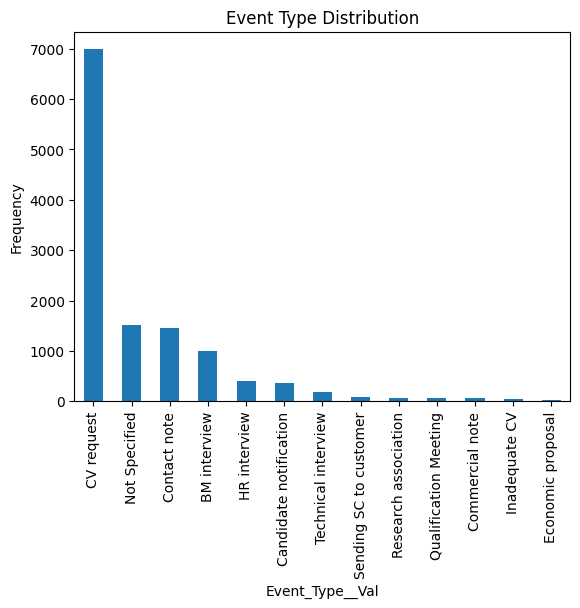
The most common type of event is “CV Request”, which means that Akkodis
has not yet received anything from that candidate. This could mean that for this
type of candidate it is not possible to determine whether or not they are
suitable for the position in question. The distribution of Candidate State
values for candidates who have not yet sent their CV is as follows:
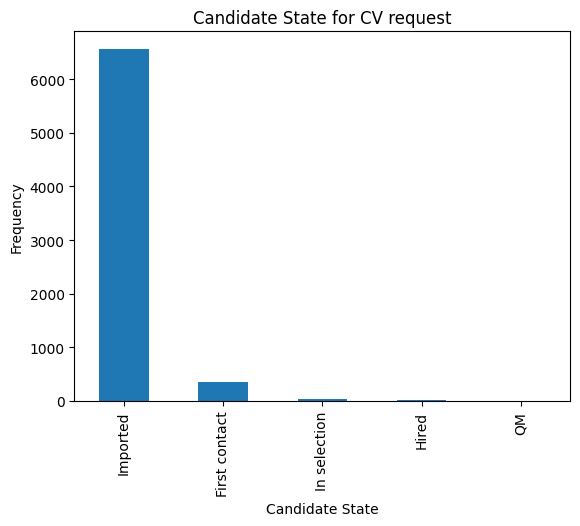
Most of these candidates have “Imported” as their Candidate State value, which means there is no way to assess their eligibility.
The 53.52% of the dataset is composed of 'Imported' candidates that have not sent their CV yet
Event_feedback
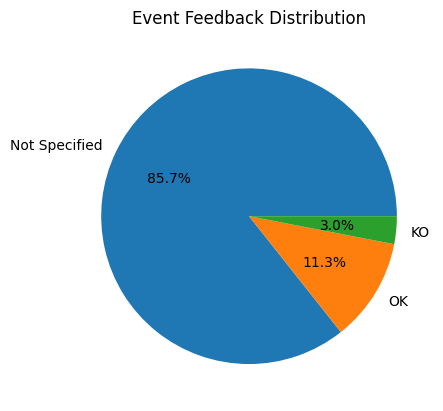
This feature could be simplified with mapping, reducing the number of possible values from 16 to 3:
There are 16 possible values for <Event_Feedback>:
 ['OK' 'Not Specified' 'KO (technical skills)' 'OK (waiting for departure)'
 'KO (proposed renunciation)' 'OK (live)' 'KO (mobility)' 'KO (manager)'
 'KO (retired)' 'OK (hired)' 'KO (seniority)' 'KO (ral)'
 'OK (other candidate)' 'KO (opportunity closed)' 'KO (lost availability)'
 'KO (language skills)']
df['Event_Feedback'] = df['Event_Feedback'].apply(lambda x: 'OK' if 'OK' in x else x)
df['Event_Feedback'] = df['Event_Feedback'].apply(lambda x: 'KO' if 'KO' in x else x)
After mapping there are now 3 possible values for <Event_Feedback>:
 ['OK' 'Not Specified' 'KO']
Data Visualization
Sex and Candidate State
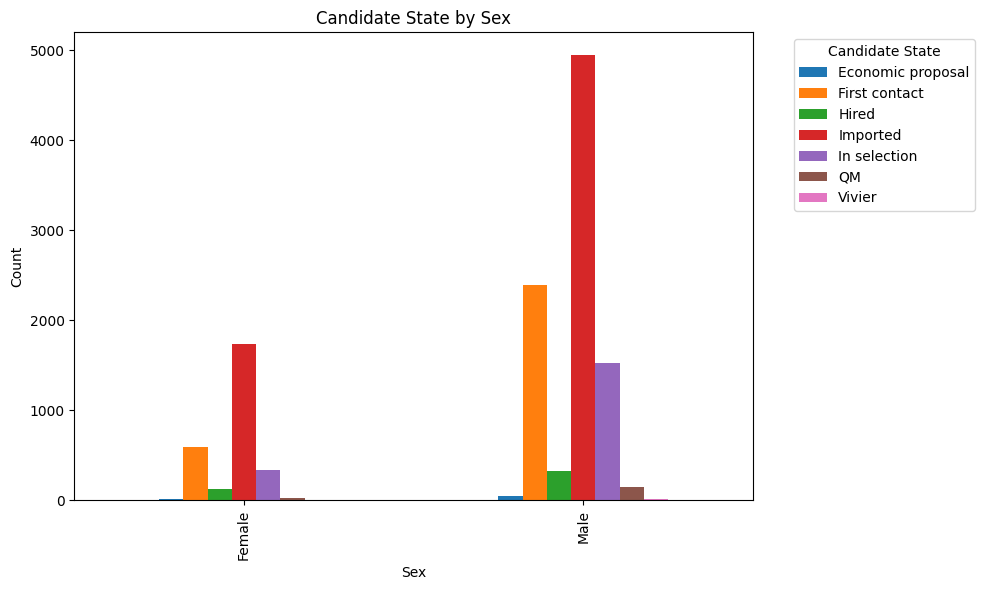
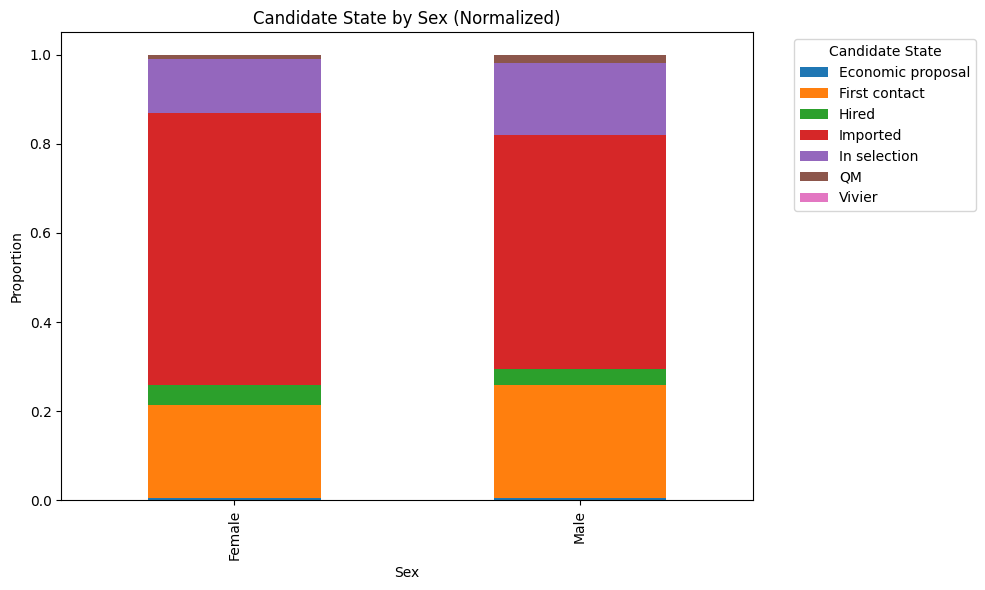
Protected Category and Candidate State
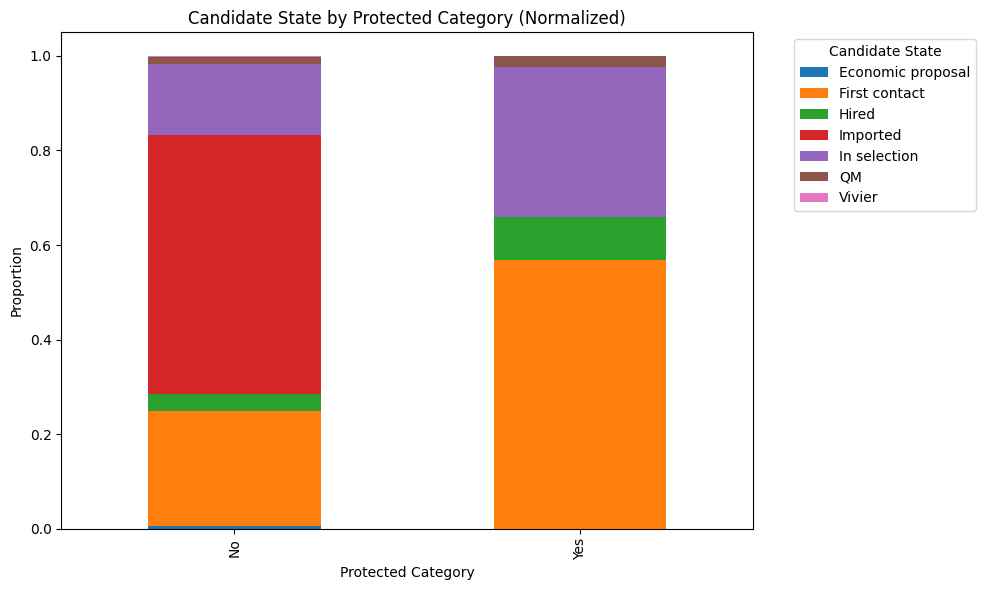
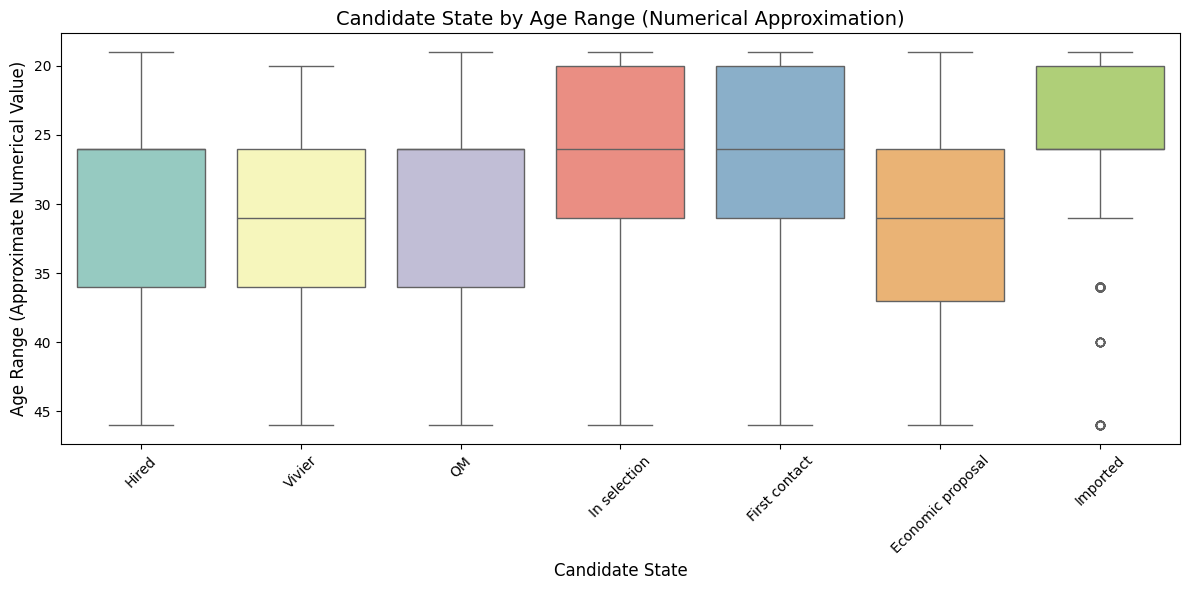
Age Range and Candidate State
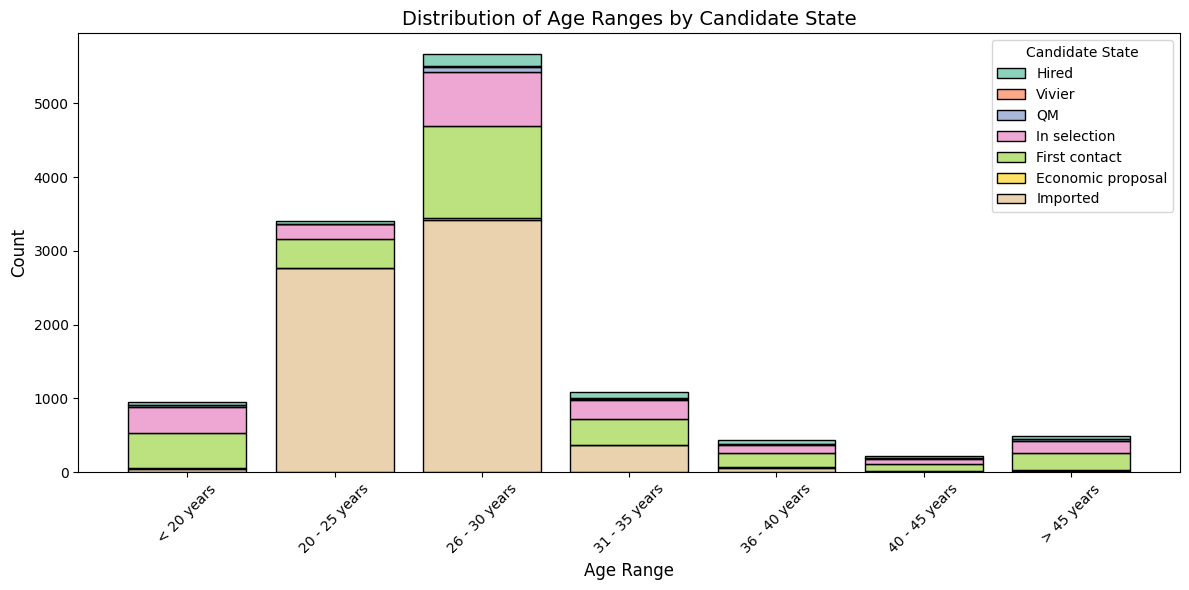
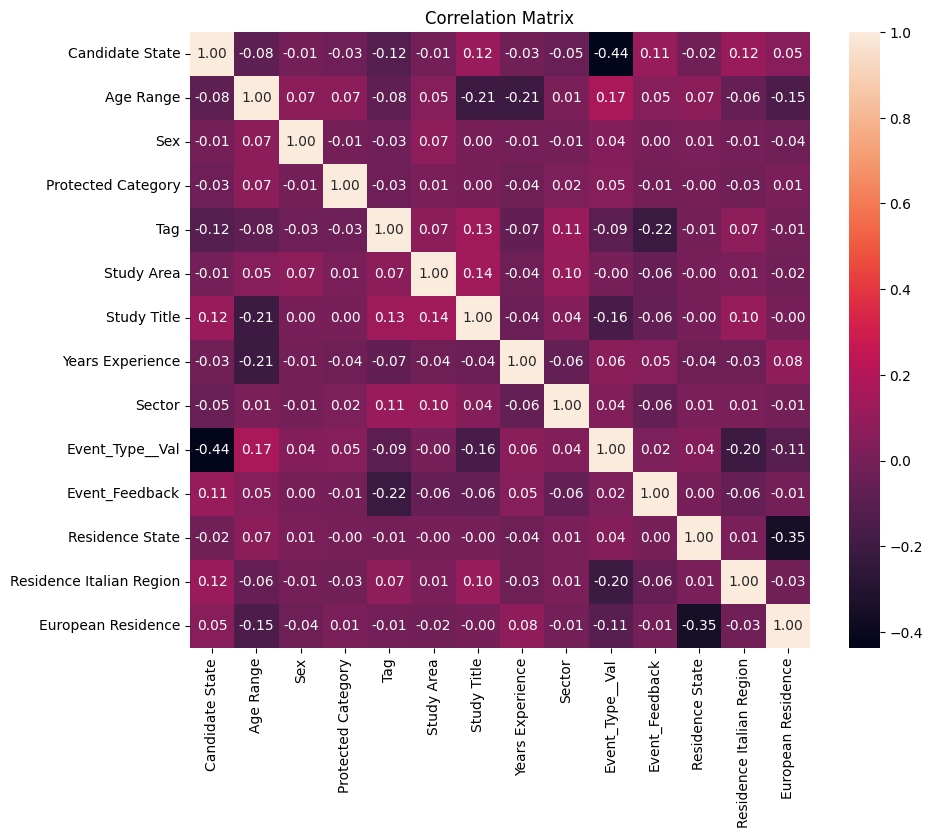
Correlation